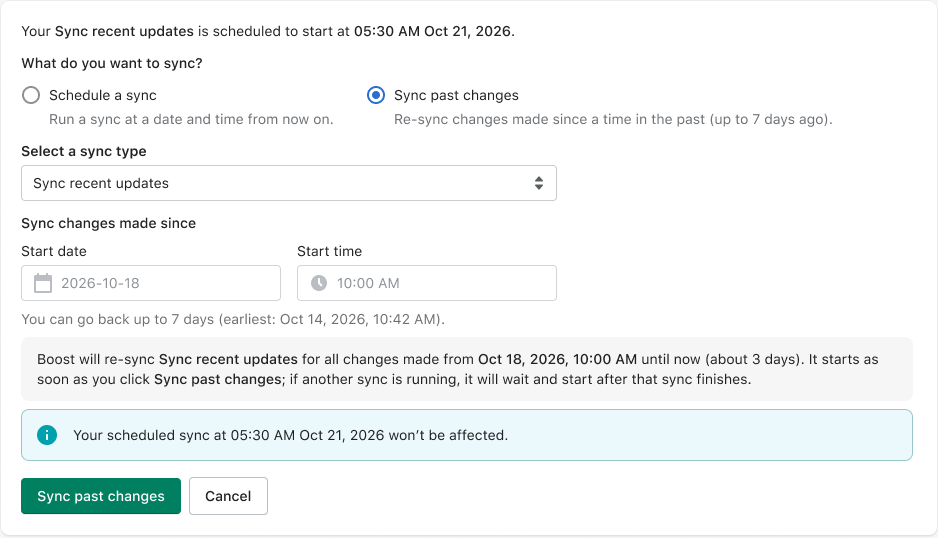
You made the change in Shopify, so you expect shoppers to see it. Sync past changes lets you check that your storefront is up to date after any big round of edits, whenever it suits you.
Until now, when you needed to get older changes onto your storefront, the only way was to contact Support. Now you can do it yourself.
What’s in it for you
Stay in control. Re-sync whenever you need to, without opening a ticket or waiting for a reply.
Go back to when it happened. Pick any start time in the last 7 days, and Boost re-syncs everything you changed in Shopify since then.
One click, no setup. Your sync starts right away. If another sync is already running, yours waits its turn and starts automatically.
Your schedule stays as it is. There’s nothing to reconfigure afterward, and your regular syncs keep running as planned.
When to use it
Think of it as a safety net after big catalog updates:
Bulk price changes for a sale or promotion
Inventory updates and product imports
Collection prep for a seasonal launch or Black Friday Cyber Monday
For example, if old prices appear in filters on Thursday after a Monday bulk price edit, running Sync past changes from Monday morning re-syncs every update, so your store is ready for the weekend.
How to get started
In your Boost dashboard, go to Sync overview and open Sync schedule.
Select Sync past changes.
Choose a sync type, then set the date and time you want to start from.
Click Sync past changes. You’ll see it under Next sync on Sync overview until it starts.
Need a hand? Our support team is just a live chat away in your Boost dashboard.
With Sync past changes, you can select a start time up to 7 days back to re-sync every Shopify update made since then, keeping your search results and filters accurate. It's just one click from your Boost dashboard, with no support tickets or waiting required. Your regular sync schedule remains unchanged.