


Merchants with large catalogs previously struggled with recommendation rules because the logic was only subtractive. To show specific products, you had to manually exclude every other collection, tag, or metafield value, which was an unsustainable workflow for complex stores.
This update introduces additive logic. Instead of defining exclusions, you now simply choose what to include, and the model automatically disregards everything else.
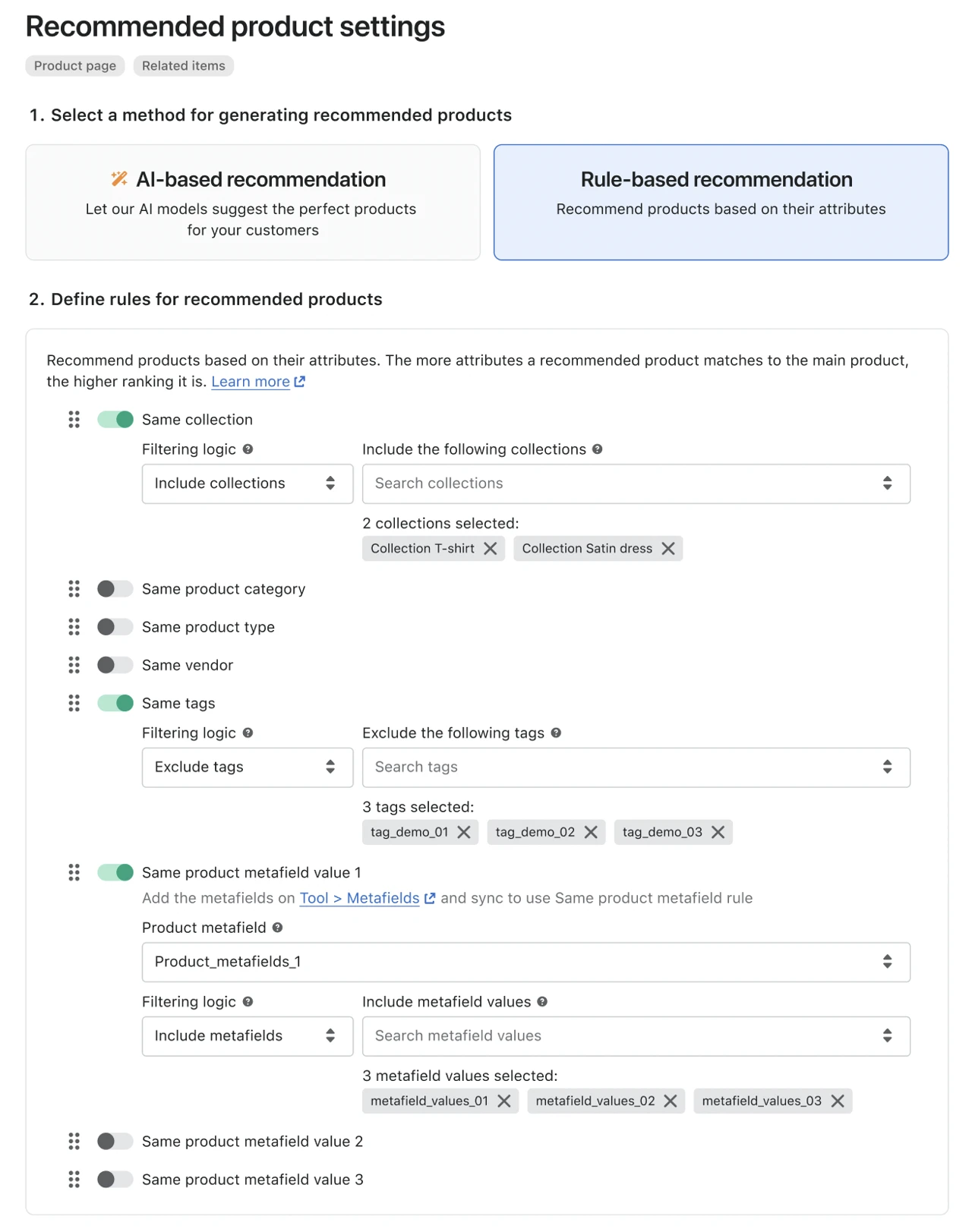
Each of the affected rule toggles, Same collection, Same tags, and Same product metafield value (1, 2, and 3), now has a Filtering logic dropdown with two options: Include (set as the default) or Exclude.
To use ‘Include’ logic, navigate to a Rule-based Frequently Bought Together or Related Items widget. Within the Same collection, Same tags, or Same product metafield value toggles, you will find a Filtering logic dropdown.
Select Include and specify the values for recommendations. Once saved, the widget will target these inputs.
This dynamic configuration replaces the need for manually hand-picked widgets on individual pages, providing collection- or metafield-specific results without per-page maintenance.