Post-purchase analytics: Know what works, even after checkout
Boost
Published
•
September 10, 2026
Feature Enhancement
Why we built Post-purchase analytics
Creating Post-purchase upsell was only the first phase; understanding its actual performance is the next. Merchants using these offers previously lacked a dependable way to track conversion rates, identify high-performing products, or pinpoint opportunities to drive additional revenue. Without centralized data, identifying successful strategies and correcting underperforming ones proved challenging. We created Post-Purchase Analytics to address this need and offer a tailored, clear overview of the feature’s impact on your store.
How it benefits merchants
This isn't another report to skim and forget. It's a direct line to smarter, faster decisions.
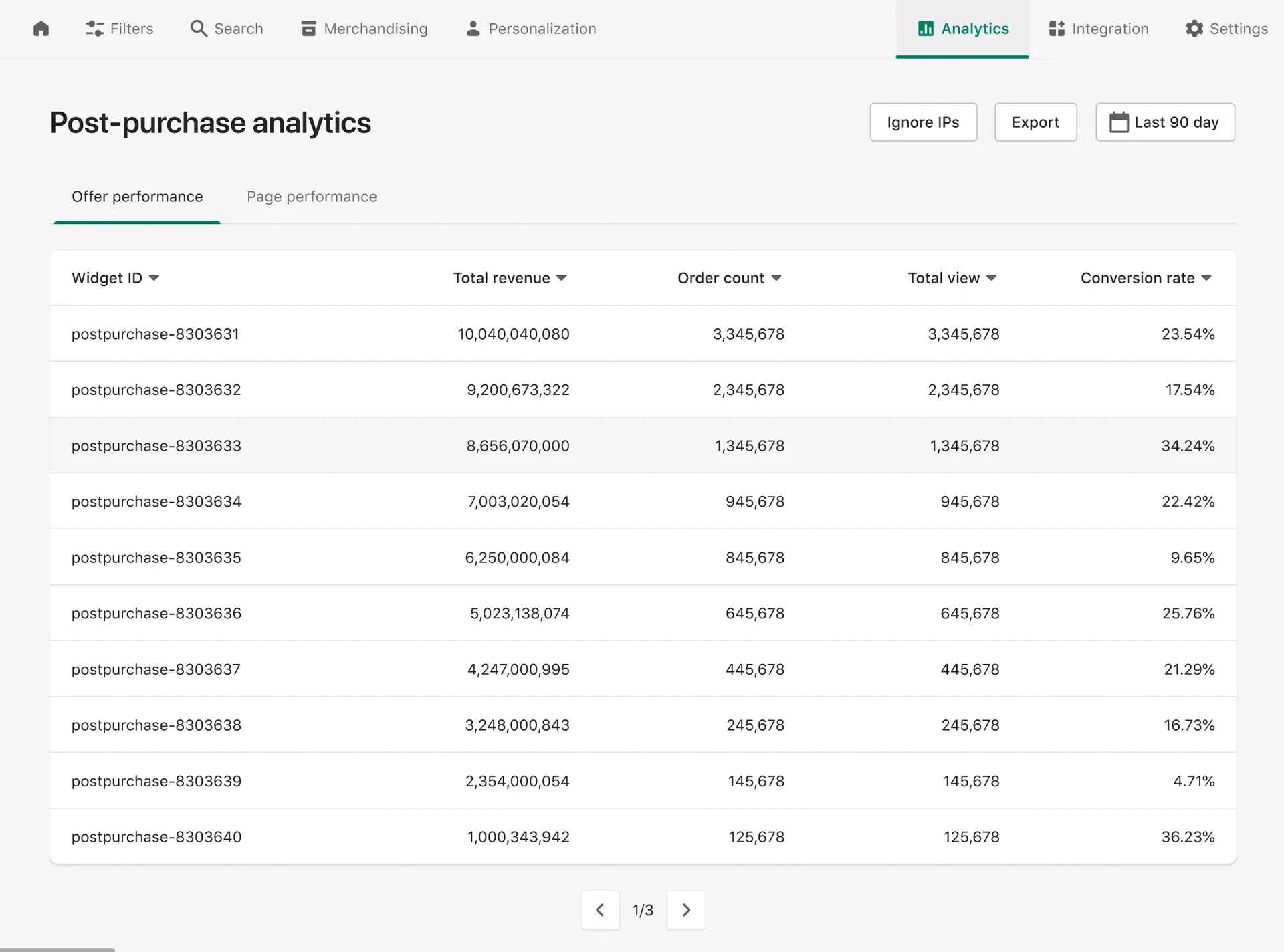
Spot your best offers fast. Sort by revenue and conversion rate to see instantly which offers are pulling their weight, and which need a rework.
Know your top upsell products. The Product Performance tab shows exactly which items shoppers accept most often, so you know what to feature next.
Decide with real numbers, not hunches. Views, orders, and conversion rate are right there, so every change you make is backed by evidence.
Get there in one click. A new "See analytics" button sits right on your offer list, so you can jump from any offer straight to its numbers.
You'll find the new dashboard under Analytics > Post-Purchase in your Boost admin, split into two tabs: Offer Performance and Product Performance. Both let you filter by date range, exclude internal traffic with Ignore IPs, and export the data as CSV or Excel whenever you need it elsewhere. Data refreshes daily, so today's view reflects yesterday's activity.
Availability
Post-Purchase Analytics is available on all plans under the new GMV-based pricing, and on the Essential plan and above (or with the Recommendations add-on) under the legacy pricing. How far back you can look depends on your plan, from 90 days up to a full year.
Understand Boost’s legacy plans and pricing evolution here.
Best practices
Read revenue and conversion rate together. A high-revenue offer riding on heavy traffic can still convert poorly. Pair the two to find your genuinely strongest offers, not just the busiest ones.
Let Product Performance guide your next offer. If a product keeps converting well as an upsell, feature it more often or build a fresh offer specifically around it.
Exclude your own team's traffic. Head to Analytics settings and add your office or staff IPs, so the numbers reflect real shopper behavior, not internal testing.
Compare periods, not just totals. Check 30-day and 90-day views side by side to catch trends early, whether that's a seasonal dip or an offer losing steam.
Export before you experiment. Pull a CSV before changing trigger conditions, discounts, or products, so you always have a clean baseline to measure against.
Post-purchase upsells are only truly effective if you can measure their impact. To help you do just that, we’ve launched a brand-new Post-Purchase Analytics dashboard. It delivers clear, instant insights into revenue, views, and conversion rates across every offer and individual product. Easily identify your top-performing offers, discover which products shoppers consistently accept, and pinpoint quick adjustments to boost your revenue. The dashboard is now available directly in your Boost admin.