Merchandise for profit, not just sales with Merchandising by Margin
Boost
Published
•
February 26, 2026
New Feature
In sales conversations with larger brands, margin comes up again and again as a non-negotiable merchandising principle. Optimizing only for revenue signals like bestseller velocity and conversion rate can accidentally push low-margin items to the top.
That’s why Boost Commerce has expanded our merchandising capabilities to margin. Merchandising by Margin gives retailers a clean, reliable way to merchandise based on profitability metrics, not guesses or manual tagging workarounds.
How to use Merchandising by Margin
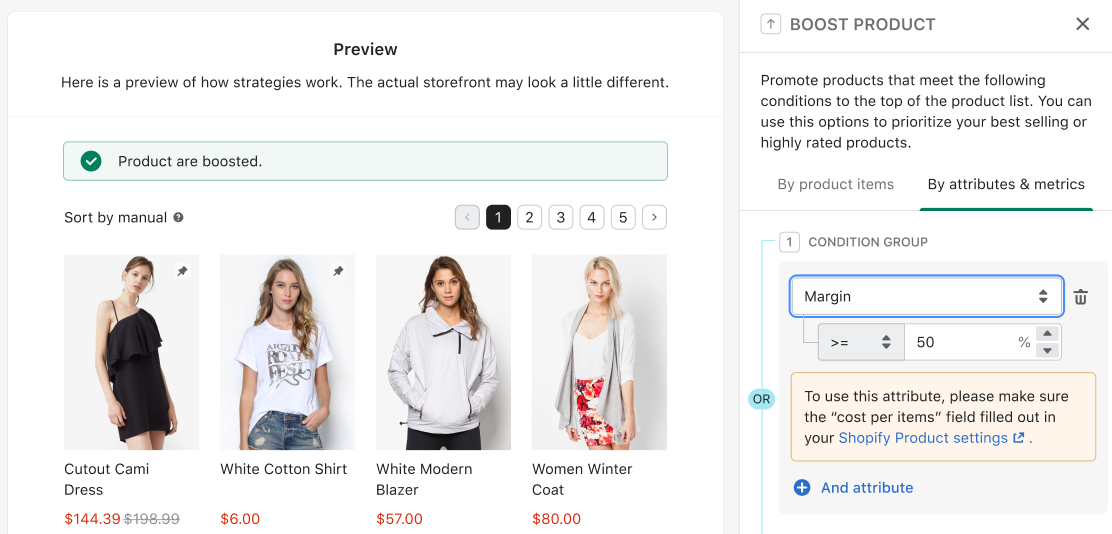
Margin is now an attribute you can use for merchandising rules in both Search and Collections. Here's the plan breakdown:
Search merchandising: Available for all plans.
Collection merchandising: Exclusive to the Launch tier and higher.
When you choose actions like Boost, Demote, Hide, or Filter, you can now set margin-based conditions using standard operators like =, >, <, >=, <=.
For margin-based rules to function correctly, ensure the "Cost per item" field is completed in your Shopify admin. Margin is automatically calculated using the Shopify price and cost per item. The system supports margin calculation using the Variant Display price and is compatible with A/B Testing.
Note that for products with multiple variants, the margin rule will be applied if at least one variant satisfies the set margin condition.
Margin stays consistent across markets by using the store’s default product data (not market-specific pricing), and to avoid system overload, margin and cost data sync kicks off when you Publish merchandising rules, then continues automatically every 5 - 10 minutes.
How this benefits merchants
Merchandising by Margin is for the teams who already know the truth: revenue is nice, profit is the plan. It helps:
Protect profit while still driving sales. You can elevate items that contribute more to the business, not just the ones that already sell fast.
Less manual work. No more maintaining fragile tag systems just to approximate margin groups. This is especially helpful for retailers reselling multiple brands with different wholesale rates.
More intentional merchandising. Set clear margin thresholds for promos, collections, and search experiences so your storefront reflects what the business needs right now.
Best practices for Merchandising by Margin
Fill in “Cost per item” in Shopify first. Margin rules depend on it, and the UI will remind you when Margin is selected.
Start with a simple threshold. Example: boost products with Margin ≥ X% in a high-traffic collection, then adjust once you see the impact.
Use margin rules for promotions, not just always-on ranking. During discount periods, margin shifts fast. Re-check thresholds so you do not over-promote items that got squeezed.
If you use Variant Display, sanity check variant costs. Margin can be calculated using variant price when Variant Display is enabled, so cost data needs to be accurate at the variant level too.
Pair with A/B Testing for confidence. Test “profit-first” ranking against your current setup so you can balance revenue and profitability with real data.
Merchandising by Margin helps you prioritize profit, not just popularity. You can now boost, demote, filter, or hide products across search results and collection pages based on margin percentage, using cost-per-item data pulled from Shopify. That means your storefront can spotlight products that actually drive healthy returns, even when bestsellers are not your most profitable items. It’s a simple shift that can make a real difference to the bottom line.